Mantra MFS 100 Drivers Installation Guide
Mantra RD Service Install: The Mantra MFS 100 fingerprint scanner is a versatile device primarily utilized for Aadhar Authentication in AEPS Financial transactions and eKYC processes. This compact device offers seamless integration with both mobile phones and computer systems, providing users with flexibility and convenience in their authentication procedures. To enable its functionality on a computer system, users must download and install the necessary drivers and Mantra RD Service software. In this comprehensive guide, we will learn step-by-step process of installing the RD Service and drivers on a computer system, ensuring smooth integration and optimal performance of the Mantra MFS 100 fingerprint scanner.
Note –
Don’t forget to install Chrome or Firefox extension to Troubleshoot and find Serial Number of mantra Device.
Chrome Extension: https://chrome.google.com/webstore/detail/biometric-device-serial-n/hhocjpebocpfhahgbphdohhoamkbcijl
Firefox Extension: https://addons.mozilla.org/en-US/firefox/addon/fingerprint-serial-number-chec/
1) Preparing for Installation
Before jump on the installation process, it’s most importnt to ascertain that your system aligns with the prerequisites. This section is dedicated to describe the essential preparatory steps for the seamless installation of the Mantra RD Service Software. From conducting correct system compatibility checks to performing essential software updates for biometric devices, every measure ensures a glitch-free installation experience.
Follow the below instructions:
- Uninstall the previously Installed Mantra Drivers and RD Service Software.
- Delete temp files. Press Windows Button+R (OR OPEN RUN) and type %temp%
- Temporary disable your Antivirus or Windows Threat Protection.(Mandatory)
- Download latest Drivers and RD Service Software from following link.
- Mantra MFS 100 Drivers – Download Now
- Mantra RD Service – Download Now
- Keep your device disconnected while installation.
- Collect all downloaded files in one folder.
2) Step by Step Installation
Step 1. Right click ont the file “MFS100Driver_x.x.x.x.exe” and select “Run as Administrator”.
step 2. Welcome window will be appear, then click “Next”
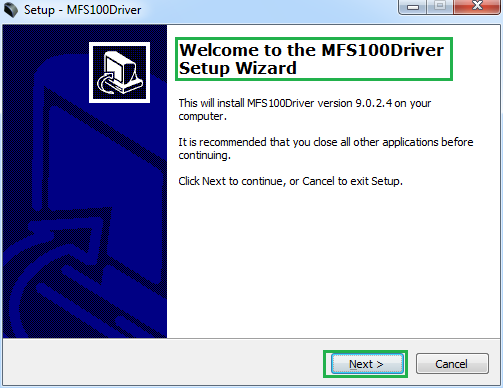
Step 3. Confirm installation Location an click “Install”
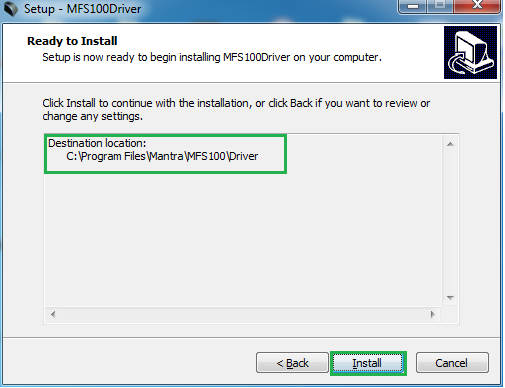
step 4. Click on the “Finish” button .
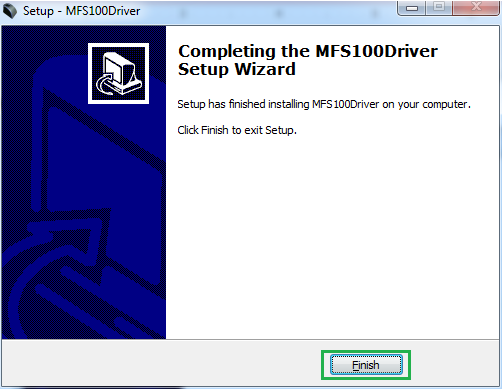
Now, you have installed “Mantra MFS 100 Drivers” succesfully. Next you’ll need to install “RD Service Software”.
Now, Lets install the RD Service Software –
Step 1. Right click on the file “MantraRDService_x.x.x.exe”, select “Run as administrator”.
Step 2. Same as previous installation, click on the “Next” button and proceed to installation process.
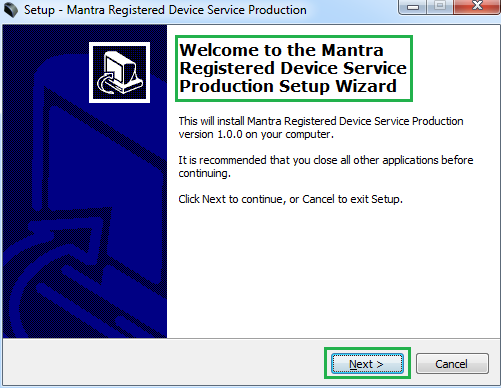
Step 3. Confirm Installation Destination, click on the “Install” Button.
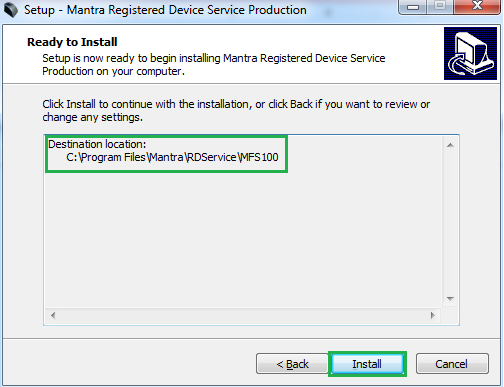
Step 4. After installation, click on the “Finish” Button.
Now, you have installed both Software Packages – Drivers & RD Service Softwares.
Step 5. Click on the Windows Button and search for the Services and check “Mantra AVDM” service is running.
Done.
3) Security Settings
Google Chrome Settings
- open “chrome://flags” in crome browser and press “ctrl+F” and type “insecure”. Now enable to Allow invalid certificates for resources loaded from localhost. Relaunch the chrome. If you dont know, click on the following link – Chrome Flag – Allow Insecure Localhost
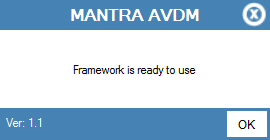
- Now Plug Device (If driver install successfully ,then popup will come at bottom-right corner and display Message “Framework is ready to use”.)
Mozilla Firefox Settings
- Open Firefox browser and write https://127.0.0.1:8005 in url and click on “I Understand the Risks.
- Click “Add Exception”, it will open Add Security Exception popup and then click “Confirm Security Exception.
Related Articles
- Mantra MFS 100 – RD Service
- Next Biometric Device – Installation Guide
- Mantra RD Service Recharge kaise kare?
- How to set up Google Pay for Business – step by step process
- Secugen Fingerprint Scanner – Driver Installation Guide
Wraping Up
The installation of Mantra MFS 100 drivers and RD Service software is a important step towards unlocking the full potential of this fingerprint scanner device with your PC. By following the comprehensive guide outlined above, you can seamlessly integrate the Mantra MFS 100 with your computer systems, enabling smooth authentication processes for Aadhar Authentication, AEPS Financial transactions, and eKYC procedures. From preparing the system for installation to executing step-by-step installation instructions, every aspect is carfully covered to ensure a hassle-free experience. With the drivers and RD Service software successfully installed, users can harness the versatility and convenience offered by the Mantra MFS 100 fingerprint scanner to enhance their authentication workflows.
Leave a Comment (0)
No comments yet
Be the first to comment!