Mantra MFS 100 is a single fingerprint scanner used for Aadhaar authentication. It is a well-known solution in the field of biometric authentication and security. Mantra’s. To make the most of this service, it’s essential to confirm the device’s validity by its serial number. In this article, we will discuss the significance of Mantra RD Service, the role of serial numbers, and provide a step-by-step guide on how to check the validity of your RD Service without using its serial number.
What is Mantra RD Service?
RD Service is a revolutionary solution that used to whitelist biometric device to authenticate a person using Aadhar number. It ensures that the biometric data captured by these devices is secure, private, and compliant with government regulations.
Mantra RD Service is essential for applications involving Aadhar-based verification/authentication, SIM card activation, eKYC, and other sectors where biometrics play a important role.
Is it poossible to check Mantra RD Service by using Serial Number?
No, there is no any system developed Mantra manufacturer or other third party service provider to check mantra’s RD Service validity by using Serial Number.
However Serial number can be used for RD Service Registration and you must have this serial number handy. If you want to read about how you can find serial number, click here.
Mantra RD Service रिचार्ज
Mantra RD Service रिचार्ज करने के लिए निचे दिए गए लिंक पर क्लिक करें।
Mantra MFS100 RD Service Registration
Step by step Process
To check the validity of your Mantra RD Service, follow these steps:
Step 1) Download Mantra RD Service App
Mantra has a dedicated RD Service App for Android users, where you can check the validity of your device. Skip this step, if you have pre-installed the app
Step 2) Connect your device with your smartphone
Once you have opened the app, keep eyes on the screen and connect your Mantra device with your phone. Ensure that OTG setting is turned on in your phone.
Step 3) Get status
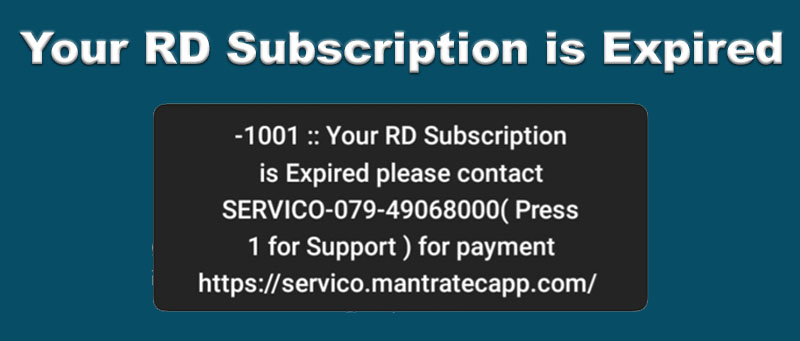
After connecting the device with your smartphone, your device information will be automatically sent to the server for RD Service validity check. If RD Service validity is expired, you will get a popup message that will show the status of RD Service validity.
if you find following message then your RD Service is expired / अगर आप नीचे दिए गए संदेश को पाते हैं, तो आपका RD Service समाप्त हो गया है।
Step 5) Take Action as Needed
Depending on the result, you should take appropriate action. If your device is valid, continue using it as usual. If it has expired, follow the guidance provided on how to renew or update the RD Service.
Now you know, how to get status of the RD Service, now you can continue to Renew/Recharge the RD Service of your device. Here is how.
More Tips
For further assistance, you can contact us to check the RD Service validity using your transaction ID, In case of you have made RD Service Renewal order with us.
You can also test the Mantra RD Service and Drivers on the our website. You can also download the RD Service and MFS100 Driver Setup softwares from our webiste.
It is important to note that the RD service validity is usually one year, and you should ensure that your device is updated and renewed as needed to maintain its functionality and compliance with regulations.
Conclusion
Mantra’s RD Service plays a important role in ensuring the privacy and security of biometric data in various applications. Checking the validity of your Mantra RD Service device is a proactive step to maintain compliance with regulatory standards and keep your biometric devices up to date.
By following the step-by-step guide outlined in this article, you can quickly and accurately perform a Mantra RD Service validity check. This process ensures that your biometric devices continue to function effectively and securely, providing accurate data capture and maintaining compliance with the latest standards.
FAQs – Frequently Asked Questions
FAQs for Mantra RD Service Validity Check Using Serial Number
-
1. Can I Check Mantra RD Service Validity Using the Serial Number?
No, there is currently no system developed by Mantra or third-party service providers to check the RD Service validity using the serial number. The serial number is essential for RD Service registration but cannot be used to directly check validity.
-
2. Where can I find the serial number of my Mantra RD Service device?
The serial number of your Mantra RD Service device is usually located on a sticker or label on the device itself.
-
3. Where Can I Find Additional Support for Checking Mantra RD Service Validity?
For further assistance in checking the RD Service validity using your transaction ID or if you have made an RD Service renewal order, you can contact the service provider. Additionally, you can test the Mantra RD Service and drivers on our website, click here to go.
-
4. How Long is the Typical Validity Period for Mantra RD Service?
The RD Service validity period for Mantra devices is usually one year. It is important to keep track of this validity period and ensure timely updates and renewals to comply with regulations and maintain device functionality.
-
5. What Should I Do If My Mantra RD Service Validity Has Expired?
If your RD Service validity has expired, you should follow the guidance provided on how to renew or update the RD Service. It is crucial to ensure that your device is updated and renewed to maintain functionality and compliance.
-
6. What Steps Can I Follow to Verify Mantra RD Service Validity?
To verify the validity of your Mantra RD Service, follow these steps:Download the Mantra RD Service App.Connect your device to your smartphone.Get the status of your device’s RD Service validity.Take appropriate action based on the validity status displayed.
Leave a Comment (0)
No comments yet
Be the first to comment!