Flipkart Pay later KYC
Flipkart Pay later facility now only available for those who have completed KYC which is now mandatory for all customers. If you are using Flipkart Pay later and not completed KYC then you cant access Pay later service. You need to complete online KYC first which takes just 1 minute to complete.
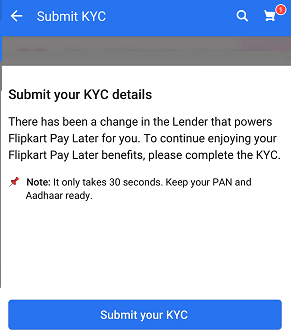
According to Flipkart “There has been a change in the lenders that powers Flipkart Pay Later for you. To continue enjoying your Flipkart pay later benefits, please complete the KYC.”
What is Flipkart Pay Later
Flipkart Pay Later is a digital credit product that allows eligible customers to make purchases on Flipkart and pay for them later. To use Flipkart Pay Later, customers need to complete the Know Your Customer (KYC) process.
Flipkart Pay Later facility allows all customers to buy any products and pay later next month. The limit of Pay Later account starts from Rs.5000 and it will increase if you pay your dues on time.
Here we will tell you how to complete KYC online for Flipkart Pay Later account in just one minute.
Additional Reading –
- PAN Card is mandatory for Bank Account
- Flipkart Pay Later Charges
- Earn more interest with Auto Sweep Facility in Banks
- Flipkart Delivery Franchise
- How to use Flipkart gift card
Re-activate Flipkart Pay later By complete KYC Online
In case of your KYC expired complete the KYC. This facility is available in Flipkart App.
To complete KYC for Flipkart Pay Later account you just need to submit your PAN Card number and Aadhaar card number and complete one-time authentication using Aadhaar registered mobile number.
#1 Flipkart App – Profile
Open Flipkart Pay Later account and you can see it is asking for submitting KYC, tap on Submit your KYC.
#2 PAN Number and Aadhar Number
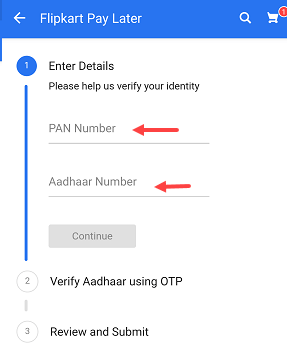
Next screen enter your PAN Card number, your Aadhaar card number and continue.
#3 OTP on Aadhar Registred Mobile Number
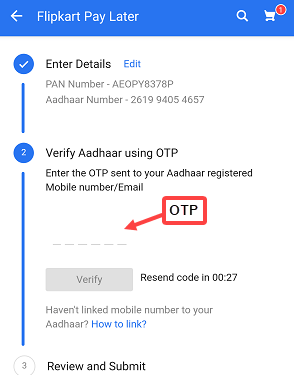
Now you will receive OTP on your aadhaar registered mobile number. Enter this OTP and click on verify.
#4 Review Details
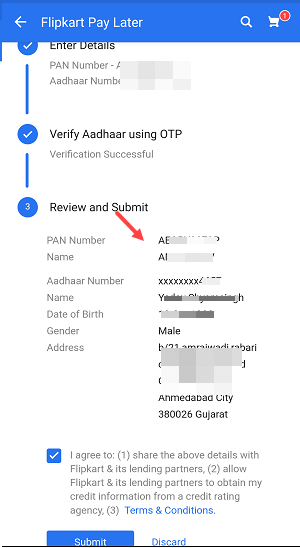
After OTP verification, now review your details are correct and submit your details.
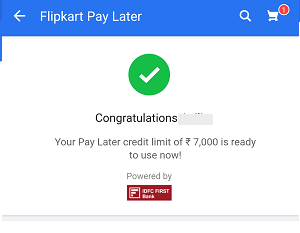
#5 Flipkart Pay later – ready to use
Done! you have successfully submitted your KYC to reactivate Flipkart Pay later. Now you can use your Pay Later account again.
Flipkart Pay Later is a digital credit product that allows eligible customers to make purchases on Flipkart and pay for them later. To use Flipkart Pay Later, customers need to complete the Know Your Customer (KYC) process.
The KYC process for Flipkart Pay Later can be completed in a few simple steps:
- Open the Flipkart app and navigate to the “My Account” section.
- Under the “My Account” section, select “Flipkart Pay Later” and then click on “Complete your KYC.”
- Fill in your personal details like your name, date of birth, address, and contact information.
- Upload a scanned copy of your government-issued identity proof, like your Aadhaar card, passport, or driver’s license.
- Once you’ve submitted your details and identity proof, your KYC will be processed. If your KYC is approved, you’ll receive a notification within a few minutes.
- If your KYC is not approved, you’ll need to reapply and submit your details and identity proof again.
Once your KYC is completed, you’ll be able to use Flipkart Pay Later to make purchases on Flipkart and pay for them at a later date. It’s important to note that not all customers are eligible for Flipkart Pay Later, and eligibility criteria may vary based on factors like your credit score, transaction history, and other parameters.
Leave a Comment (0)
No comments yet
Be the first to comment!